BIM and Risk Management

First off, I’m not a lawyer, but I’ve sat through conferences with many of them, enough to know that the legal liability of an architect is at minimum, daunting, at maximum… well, let’s not (hopefully ever!) go there.

A client firm has a multi-family housing studio, and with the recent market swings from home ownership to apartment and condo living, are preparing for an increase in those services (fingers crossed, right?)

I’ve been asked to review the AIA Trust Condo Risk Management series of documents, and highlight areas that their new adoption of BIM could affect.  Suffice it to say, there are a LOT.  Much of the risk management of a firm is still tied to contractual language and CYA reviewing of a developer’s long term plans (new vocabulary word: Indemnity), but of course, design documentation is a legal document, and CDs and CA documentation play a very large role.

Happy to report, the collective recommendations by the Trust are largely in sync with the processes and benefits of effectively using a BIM methodology over conventional CAD documentation.  Worth noting through the series is the emphasis on resisting reduced services on the part of the architect.

Carefully evaluate reduced scope of services offered by the developer… With increased risk of condominium projects, more design control can actually reduce your risk. Avoid fragmented delivery of design services where (others) provide only partial designs…

This is persuasive verbage towards applying a form of Integrated Project Delivery, rather than detached design services with minimal control over subs.  Yes, it will involve more time (and hence more money) than what the developer may propose for economy, but it reduces overall risk of all parties involved – INCLUDING the developer.  This carries more weight based upon the developers intended relationship to the project over time, of course.

More emphasis on qualification-based selection of general contractor and trade subs.. especially for areas that draw claims: HVAC, building roof and skin, windows.

Now, designing with BIM is no guarantee of a GC or sub’s experience or expertise, nor is BIM a magical process, and it won’t take a dysfunctional firm into the realm of smooth and risk-free design (a mythical world that no one has ever seen).  What BIM CAN do is make quantifiable (visually and in accurate data) MORE of a design than standard 2D documentation can in comparable time. And that means more awareness of problem areas, earlier. More cross-checking prior to bidding and construction. More opportunities to ask the right questions of the right parties. More exposure to the coordination issues that lay at the heart of good architectural design.

My conclusion:

The AIA Trust risk management series definitely focuses on the legal preparation for engaging in current or prospective conversion condominium projects, but design documents ARE part of that package, and the more accurate and integrated with specialty consultants and subcontractors they can be, the less sole risk the architect carries.  BIM can increase that accuracy and integration.

Good reads:
Architect’s article on the Side Benefits of BIM
McGraw Hill’s Construction BIM Special Section
Randy Deutch’s blog BIM and Integrated Design


Posted in Architecture, BIM/Revit | Tagged , | 2 Comments

Introduction to the Revit .ini

All of the default settings and operations in Revit are controlled by the .ini file in the install.  The ini file is the portal for any customization of your Revit environment, from changing the background color from white to black,  defining all the content loading default paths and pop-up message behaviors, to nitty-gritty stuff like optimizing parallel processor usage.  The ini works in conjunction with the .dll files, which are the programming bits themselves.

My current project team quest is to redefine the Schedule’s default font and text size, because the Revit schedules will ultimately be exported to DWG linework for merger with the client’s existing Master Plan data.  This project team is continuing to work in RA2011, due to outside factors, and so the customizing process is different than it would be for RA2012, which creates an ini file on the fly, with each load of Revit.

My main issue is the lack of documentation on customization from Autodesk. The .ini file is essentially a list of overrides to the .dll default install settings, so the .ini itself is not a full list of commands. It’s like the VG panel, which allows you to set a visibility override, but doesn’t tell you what the default setting is in the first place.  In the case of the .ini, it means I either guess at the command prompt (impossible), or I run a command, research the resulting journal files, and see if I can uncover the prompt there. (Tried with the schedules, nothing defining font/size).  My research came up with some useful tips (again, RA2011 and earlier, and not addressing my issue) which does provide some insight as to how the .ini works as a YES/NO trigger:

(RA2011 & prior) http://revitclinic.typepad.com/my_weblog/2010/03/10-revitini-customizations.html
(RA2012) http://revitclinic.typepad.com/my_weblog/2011/08/and-the-revitini-file-strikes-again.html

As for my original Schedule font/size issue, I filed a support request, and we’ll see what Autodesk comes back with.

update: Reply from Autodesk

Adjusting the INI file is not something that I am aware of being used to change the defaults as you indicated. There are some basic things you can adjust in an INI file, but there are limits as to exactly what this can do.

Our development resource is the Autodesk Developer Network, but this area is mostly for users building custom plug in components and add-ins. There is no specific resource for INI functions.


Posted in BIM/Revit | Tagged , , , , , | 1 Comment

Revit/CAD Hybrid Projects

This topic came up in a consulting session today, and it echos an exchange I recently had over LinkedIn, so I’ll recap things here:

LinkedIn email from a past colleague:

How do you recommend to handle details and front end boiler plate info on a Revit project?

Although my current office is slowly making the transition to Revit, we are still setting up dummy references and dummy sheets in Revit, maintaining an AutoCAD and Revit hybrid.

Their excuse is that that is how other firms they have surveyed do it. My opinion differs.

And my reply:

Arch firms are all across the board on this one. The primary issue is if the office is doing dual-software documentation – some teams still working fully in CAD, some in Revit (with a CAD detailing backend). It’s tough to maintain the boilerplate/standards stuff in two divergent formats, so most firms running both maintain/update the CAD, and opt to just port it over into Revit. Not the best in terms of flexibility for the Revit teams, but it seems to be the preferred method to manage for consistency. Firms who’ve gone full Revit will eventually (read: summer intern season) transition these over to Revit detail views, and set up sheets that can be transferred to other Revit projects with ease.

A few main points about hybrid documentation: archiving is more tedious and leaves a convoluted mess for anyone retrieving in the future, unless file naming conventions are militantly followed. Your information today is only as good as your ability to find it tomorrow.

:::

While I long to live in a Revit documented world, I also resort to CAD historic documentation from time to time (although I try to convert to Revit details as I go, if time allows).  Some things are just easier to knock out in 2D linework in CAD, especially if it’s a format conversion from another software (Civil 3D, I’m looking at you) or a handsketch that’s been vectorized (I currently use Illustrator – anyone tried RasterVect or Skencil?) and an office HAS to have CAD on hand anyway, to deal with coordination files from collaborators not using Revit.


Posted in BIM/Revit | Tagged , , , | 1 Comment

MGMT views – Work those schedules!

It’s taken me a while to get the more senior staff to open up a model file.  They are rarely ever ‘hands on’ in the production aspect of the project, and are (the unspoken truth) a bit intimidated that they’ll cause a model disaster and have the entire office (let alone the horrified production team) to answer to.

How to get them to fear less, and review more?  I apply two methods:

1) I give them detached versions of the model for spot-check reviews.

2) I entice them with preset Management views (primarily Schedules).

Management views are any report (graphic or data) that gets to the heart of the issue – whether its a Sheet List showing what sheets went out with what issue, or an overall floor plan that color-codes the 2-hr area separations and reports an accumulated occupant load exit route.   It can be as simple as a condensed sheet list for total count to enter on the permit submittal forms, to as advanced as a tracking list of all distributed SK responses to RFIs (what? do you still get any of those?) and which aggregate Bulletin they were issued in, and what governing authority it was issued to.  For senior staff to have access to all that – with just a few double-clicks of the mouse, in a safely separated model, is, to borrow the words from a popular ad: Priceless.


Posted in BIM/Revit | Tagged , , , | 2 Comments

Little Things Matter

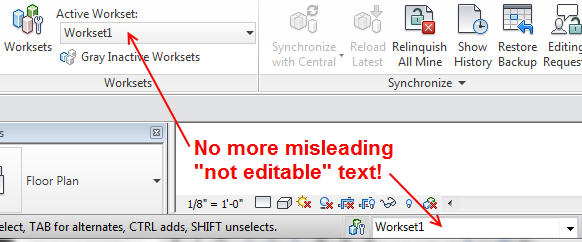
I’m still playing with the new features of Revit Architecture 2012, and while there are some new tools that are intriguing (parts, assemblies and analysis), THIS is what I’m currently appreciating the most:

Ah, yes, the little things really do matter! 2011 felt it was most important that I be really REALLY clear on what program I was currently using and who owned it, with the file name as an afterthought. 2012 trusts that I know what the program IS, and I really should be more concerned with what actual PROJECT I’m currently active in.* Thanks for coming around on that one, Autodesk!

*8/2011 – SP1 actually returned the UI header to the original, real-estate wasteful status of using 34 characters to list the program before listing the project.  In Twitter perspective, that’s akin to 24% of your message (from the start) spent defining the service that everyone using the service already knows.

Now I need to check and see if they’ve finally removed the horribly misleading “Not Editable” business for worksets…. YES! YES ! YES!

Okay, THAT is my new favorite thing! (Who says I’m not easy to please?!)


Posted in BIM/Revit | Tagged , | 2 Comments

ahhhh, ADA clearances! (fist shaking)

Everyone wants to have accessibility clearances built into families. Sure, why not? Pop in that door or drinking fountain, and BAM! (sorry, Emeril!) you got your clearances RIGHT HERE!

This topic came up in a recent AUGI post, and I (naturally) have a pretty strong opinion on it. I’ll save you a click (unless you want to read through others’ comments) and repost my reply here:


This is something that gets asked for all the time, and here’s the deal: you have to really commit to accurately creating and using families with those clearances built in – especially doors. 

Because there’s so many variations. Push side on a straight-on approach. Push side with a side-approach. Same with the pull-side. And if they change from one side of the door to another? More variation. And active leaf conditions? Revit won’t assess the scenario when the door is placed, the user has to do that, and it’s then either a Type variation (can wreck havoc on your door schedules, if filtering/sorting by type ever becomes a need) or a whole lot of instance variables, which become MUCH harder to track and manage. And lets not even start on making sure the creator of that family is consistent in building those visibility settings into EVERY door family to be used by that firm so that the workflow is consistent not just from project to project, but within the same project! It needs to be very thoroughly thought through from the beginning.

I now have my teams place separate generic models for the clearance outlines adjacent to the doors, so they are making a conscious assessment. They are visible in working views, but filtered out in documentation views.

Now, THAT SAID, I do think that built-in clearances around drinking fountains, sinks, etc are pretty doable, it’s just that those darn door families make so much (variation) trouble, that THEY set the workflow.  If I’m going to model in clearances, I want to be able to control their visibility with ONE METHOD, not a different method per category.
Think about it, and trust me, you’ll thank me.


Posted in BIM/Revit | Tagged , , , , | 4 Comments

Understanding Family hosting relationships

Component Family Template Hosting Options: When creating custom component families, be aware of which family template is selected at the onset, as each template can have built-in behaviors regarding required hosting conditions.

Most common hosting options are:
Wall-Based – Must be installed on a wall assembly, and in the case of doors/windows, will automatically cut an opening into the hosting wall
*Face-Based – Must be installed on another element’s planar surface. (ie: Light fixtures that need to be mounted to the underside of concrete beams or trusses)
*Ceiling-Based – Must be installed on a ceiling assembly. (This is a coordination issue if your lighting consultant /MEP designer is building their own model, but the ceiling elements are in the Architect’s model.)
Floor-Based – Must be installed on a floor assembly. (Similar coordination issue if the floors will be owned by one consultant, while the elements placed are created by another in a separate model.)
Site Component – families will ‘attach’ themselves to varying elevations of a toposurface in the model, rather than to a standard horizontal workplane of a Level.

TIP:  ONLY use hosted templates if you expect that the hosting condition will always be available.  It is not possible to remove the hosting requirement without rebuilding the family into a non-hosted template.  If you have a hosted component and need a non-hosted version, copy/paste the geometry into a non-hosted template, then rebuild the parametric controls as needed.

*These family templates by default orient the host face similar to a floor, so the modeler has to envision their element in the proper vertical orientation when constructing it. A minor inconvenience, but it is what it is!

Posted in BIM/Revit | Tagged , | 2 Comments

Troubleshooting Guide – sample

Initial training a team on new software is one task – educating them on the often analytical means of troubleshooting issues as the model progresses is a completely separate one.

I’m working on an extensive Troubleshooting Guide – divided up in to sections:  Output graphics, Visibility and Workflow, Data Management, where a variety of common issues have prompts for a user to check, from project-wide  down to individual elements.
I’ve included a snippit as an example, below:

The goal to this project is to educate the teams to quickly assess a situation to know if the problem is systematic, and thereby resolvable via settings, rather than to immediately turn to ‘forcing’ overrides onto individual elements, which is a very human tendency, especially when under deadline pressure.

I’ll be running this by my BIM Manager collaboration team, and will hopefully be ‘field testing’ it among the project teams by mid-summer!


Posted in BIM/Revit | Tagged , , | 2 Comments

Realities of Revit implementation (and why I won’t answer to ‘guru’)

I consult for several architectural and engineering firms, and on occasion I hear the team(s) refer to me as their Revit ‘guru’. While the intention is innocent enough, it always makes me cringe. Guru seems to suggest someone who has some mystical knowledge to ‘pass down’ to their followers, which leads to deliverance; success. While I agree that years of experience with the software does lead to a few ‘pearls of wisdom’ to share (see previous posts), I am adamant in my approach to Revit consulting – it’s about defining a unique approach towards a process, not about handing down a manual.

Here’s an important point to establish: an office shift to Revit is generally not about just choosing to use different software. It’s most likely a response to some other factor: a firm’s goals to become more efficient in project development workflow; a collaborative agreement with a multi-discipline design team to improve coordination along the design process; or the too often cited mandate: the client’s deliverable requirement.  I have seen each of these motivators have vastly different impact on how a firm responds to changes to their processes, and therefore a direct impact on how successful they are at making the shift.

I am a Revit Strategist. As such, I ask a lot of questions, gather information, challenge some perceptions, and synthesize the lot into a series of approaches that are then presented to a design team. There are ‘if, than’ discussions, and ‘why to do now, in order to get later’ posits, and a TON of ‘why was it done this way, and is that appropriate now?’ queries. It’s never easy to get an established workflow to change, and it’s key to impart to a team WHY they would benefit from change. It’s equally important for them understand some repercussions of resisting change, and it’s critical for them to see that it is their decision.

As the saying goes: If you are willing, you are able.
As this implies: If you (or your team, or your upper management) AREN’T willing…
…. you get the picture.

Willingness, let me be absolutely clear, goes beyond the team designers, and extends to the firm’s principals. Often, the challenges aren’t limited to design process, but also to manpower staffing approaches, capital equipment investment positions, all the way down to philosophies on imparting and cultivating knowledge across staff. All of these circumstantial factors affect how a firm can approach the transition. Some firms embrace the challenge, and see it as an investment towards one of those greater end goals. They understand their responsibility in committing to a strategic approach, which often involves trial and error, reevaluation and validation. That takes time, and as we all know, time equals money. We’re also painfully aware that money isn’t plentiful in this economy.

All of this takes communication. Establishing the firm’s goals – short- and long-term – in making the transition. Understanding the limitations. Defining the benefits, and discussing the repercussions. Identifying opportunities that go beyond the immediate task at hand.  Addressing the many factors that influence a team’s ability to adapt and succeed. Setting targets, gauging progress towards them, reevaluating the sustainability of the approach. Defining an exit plan, if needed. This is NOT a by-the-manual process. It is a strategic process, and no guru can simply make it happen.

My approach to consulting for Revit implementation is in stages:  I meet with the management team and lead discussion on identifying the motivation, defining the goals, and targeting metrics of evaluation.  I advise on selecting a flagship project to apply Revit, and assess the team’s existing skills to define a schedule for training and advanced project support. I then directly collaborate with the project team, providing baseline training and as-needed advanced level guidance and customized workflow processes in response to the design development.

The results have been rewarding. Users who have confidence in their skills, at levels appropriate to their tasks.  Teams who aren’t just good at building virtual models, but are actively engaged in the analytical process of building an efficient, data-integrated project deliverable.  Smart modelers.


Posted in BIM/Revit | Tagged , , , | 2 Comments

Proper application of a Type Catalog

I recently replied to an AUGI posting from a user who was struggling with a test case for building a Type Catalog.

Type Catalogs are great tools for families that need many types, each with new parameter values, such as dimensional drivers (ie: Width, Length, Height), but also for customized parameters or manufacturer info, etc.

The user created the catalog, and was puzzled as to why it wasn’t feeding in the proper values into the family.

The problem was simple: The user didn’t understand the process of a Type Catalog.  The family itself does NOT hold all the various types – it’s sort of a ‘prototype’ version, with all the parametrics set up to RESPOND to the catalog.  It is in the loading of the family into a project file where Revit will automatically open the catalog, allowing the user to select the types desired. In the loading process, Revit will create the unique types, and apply the specific parameter data. Voila!

This is a HUGE benefit for content that requires many type variables (full product lines of equipment, furnishings, etc), without the tedious process of creating the types within the family itself. Suppliers of the Type Catalog/Prototype Family package have a LOT more control of their content as delivered to the end user, and updates are faster, and more accurate.

Contact me for guidance on creating advanced Type Catalogs for your customized Revit family content:  info (at) apertedesign (dot) com


Posted in BIM/Revit | Tagged , , , | Comments Off on Proper application of a Type Catalog